The Podcast Room is the self-service multimedia production space in the library. Equipped with easy to use audio and video recording devices, this facility is reserved exclusively for creating of teaching and learning related audio and visual materials, academic programme promotion and cultural engagement purposes.
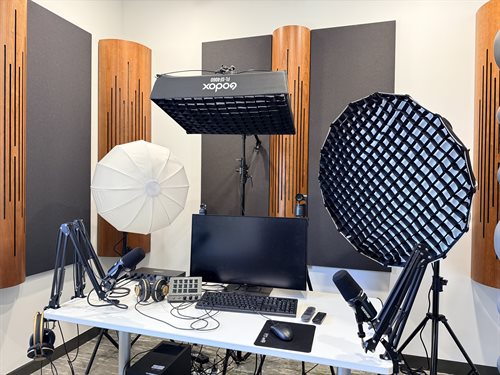
Location: Room 203, Second Floor
Available Equipment & Tools
- Dell Precision 3630 Workstation: Intel Core Processor, i7-9700K @ 3.60GHz; GPU, NVIDIA RTX2080 SUPER; RAM, 16GB; Storage, 4.1TB
- Three OXGOD SL & FL Series LED Video Lights
- Two OBSBOT PTZ Webcams
- Four USB/XLR Dynamic Microphones SHURE MV7+ & Monitor Headphones
- Sound Card: TOPPING E4x4 Pre
- Teleprompter
- Audio Recording Apps: MOTIV Mix, Adobe Audition, Waveform 14 and etc.
- Video Recording Apps: OBS Studio, OBSBOT Center, Panopto and etc.
Eligibility & Policies
All UNNC students and staff
This room is dedicated strictly to audio and video production. Using this space for general study or non-recording activities will result in the immediate forfeiture of your reservation.
The room is used mainly on a self-service basis, and new users will be provided with training on operating the equipment.
When using this room, no alterations to the room layout are permitted, nor may any additional decoration or furnishing be carried out.
Booking Information
- Operating Hours: Daily | 9:00 AM – 9:00 PM
- Room Capacity: Maximum 4 users
- Session Limit: Up to 2 hours per session (separate applications required for consecutive slots)
- Advance Notice: Must be booked at least 3 days in advance
Booking Rules
- Reservations must be submitted by a main user, with all accompanying users listed on the form.
- Applications are processed within 2 business days. You will receive an email confirmation or alternative slot options if your time is unavailable.
Submit Room Booking Request Form
Check-in and Check-out Procedures
- Check-in: Arrive at the 2F Library Information Desk 5 minutes before your slot. Present your Campus Card to pick up the key.
- First-Time Walkthrough: Staff will brief new users on operating the software and equipment.
- Check-out: Notify library staff for a quick equipment inspection before returning the key to the 2F Information Desk.
Resources & Assistance